Save TikTok Recipes You Can Cook Using the Five Field Test | Dinner Roulette Pro
September 9, 2026
Save TikTok Recipes You Can Cook Using the Five Field Test
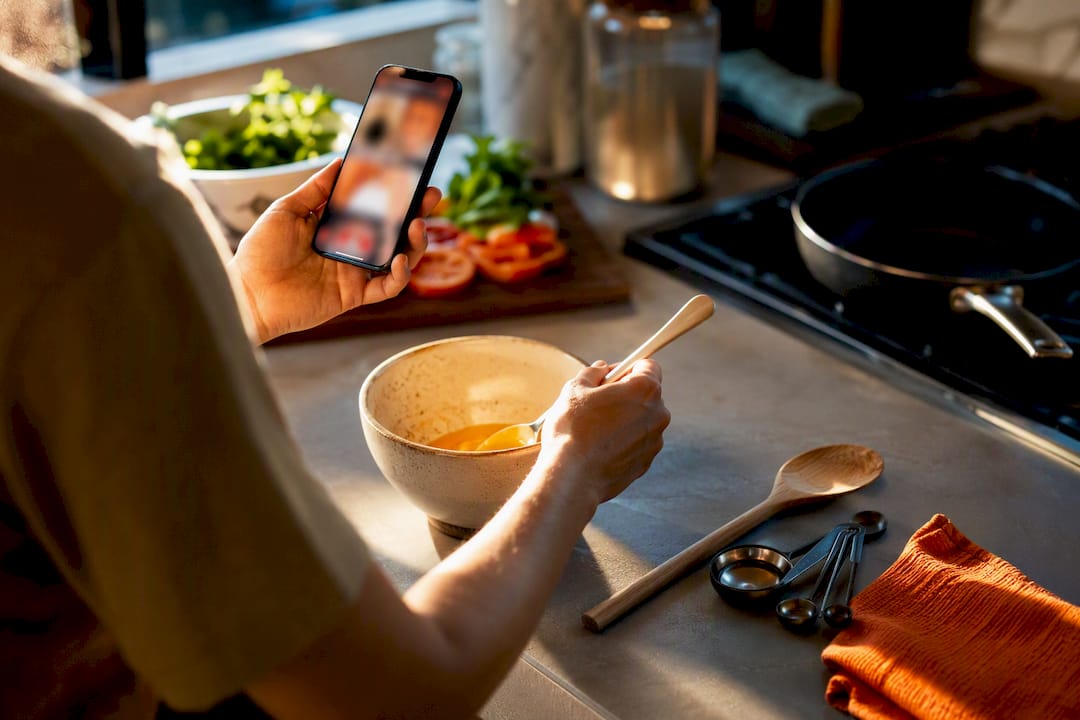
The fastest way to save a TikTok recipe so it survives long enough to cook is to import the video’s link into a recipe keeper and check it against five fields: title, ingredients with quantities, ordered steps, cook time and servings, and the source link. Tapping the heart icon only bookmarks the video, not the recipe itself, and TikTok Favorites rely on links to videos, which may become unavailable over time. Copy the link, paste it into an import tool, verify those five fields, and you’ve got a recipe you can actually cook instead of a video you’ll never rewatch.
TL;DR:
- Import TikTok recipes promptly to ensure all ingredients, steps, and cook time are accurately captured before the creator deletes the video.
- Use structured recipe apps with audio and text parsing features for quick, searchable, and editable recipe cards that include grocery list integration.
- Save only the original source link and verified recipe details to prevent losing access if TikTok videos become unavailable or deleted.
- Batch import and organize recipes with clear naming and tagging to streamline meal planning and weekly grocery shopping.
- Test and verify imported recipes by checking for complete steps, accurate measurements, and clear cook time before trusting and shopping from them.
Table of Contents
- Practical Ways to Save Recipes From TikTok (and When Each One Works)
- Turning a TikTok Link Into a Cookable Recipe, Step by Step
- How to Tag and Batch Your Saved TikTok Recipes Into Real Meal Plans
- Quick Checks to Make Sure an Imported Recipe Is Actually Cookable
- Why a Preservation-First Workflow Actually Reduces Kitchen Stress
- Techniques to Turn Recipe Video Audio and Captions Into Text
- Saving TikTok Videos Offline the Right Way
- Why TikTok Saves Disappear Faster Than You Think
- Apps Built to Turn TikTok Videos Into Real Recipe Cards
- My Own Rule for TikTok Recipes: Import or It Doesn’t Count
- Sources
Practical Ways to Save Recipes From TikTok (and When Each One Works)
Not every recipe deserves the same treatment. If you save one video a month, a screenshot is fine. If you’re pulling five recipes a week off your For You page, you need something closer to a system.
Here’s how the four common methods stack up:
- TikTok Favorites (the heart or bookmark icon). This is the fastest option, taking about one second, but it only stores a link to the video, not the recipe. You still have to rewatch the whole thing later to catch the ingredient list, and if the creator deletes the post, the bookmark points at nothing.
- Screenshots. Slightly better than a plain bookmark because you at least capture the on-screen text. The problem is that screenshots aren’t searchable, they clutter your camera roll, and there’s no way to pull “chicken thigh recipes” out of a folder of 200 unsorted images.
- Manual notes. Typing the recipe into your Notes app or a notebook is the most reliable single-recipe method, since you control exactly what gets written down. It’s also the slowest, and it doesn’t scale past a handful of recipes before you stop bothering.
- Import into a recipe app. This gives you the best balance for anyone saving TikTok recipes regularly. A good recipe preservation app pulls the caption, on-screen text, and sometimes the spoken audio into a structured, searchable card, complete with grocery-list integration.
A few things to weigh before you pick one:
- How many recipes do you actually save per week? One or two makes manual notes reasonable; five or more makes import the only sane option.
- Do you cook from your phone or from a printed list? Structured import wins for phone cooking since you can scale servings on the fly.
- Do you want a shopping list generated automatically, or are you fine building one by hand?
Turning a TikTok Link Into a Cookable Recipe, Step by Step
The import routine takes less than a minute once you’ve done it twice. Here’s the sequence that works across most recipe-keeper apps:
- Open the TikTok video and tap Share. Look for the share sheet, not the download button.
- Copy the link. Most apps show a “Copy Link” option right in the share menu.
- Paste the link into your recipe app’s import field, or use the share sheet to send the video directly to the app if it appears as an option.
- Let the app process the video. A capable importer reads the caption, scans on-screen text overlays, and in some cases transcribes the spoken audio to extract ingredients and steps.
- Open the imported recipe and check it against the five-field standard before you close the tab: title, ingredients with quantities, ordered steps, time and servings, and the original link.
Import tools vary in how much they actually capture. Some only grab the caption, which means you’ll get a vague list of ingredients and nothing about technique if the creator explained the method verbally instead of typing it out. A stronger importer reads audio and on-screen text together, which shows up directly in fewer missing quantities and incomplete steps once you check the recipe over.
If the import comes back with obvious gaps, like a missing cook time or a step that just says “add the sauce” with no measurements, you have two choices: manually fill in what you remember from the video, or discard the import and write the recipe from scratch. As a rule, fix it manually if you’re missing one or two details; start over if half the recipe is blank.
Pro Tip: Import the recipe the same day you save it. Waiting a week means you’ll forget which video went with which dish, and you’ll end up scrolling your For You page trying to find it again.
How to Tag and Batch Your Saved TikTok Recipes Into Real Meal Plans
A pile of forty imported recipes with no naming system is barely better than forty TikTok bookmarks. The fix is a naming convention you can scan in under a second, plus a small, consistent tagging habit.
Give each recipe a short, recognizable title, like “Crispy Sesame Salmon” instead of “TikTok Recipe #14.” Then apply what’s sometimes called the two-tag rule: one tag for the main protein or ingredient, one for the occasion (weeknight, meal prep, date night). Two tags per recipe keeps a growing organized recipe collection searchable without turning tagging into a chore.
From there, the actual meal-planning step is simple:
- Drag or add three to five imported recipes onto your week.
- Let the app merge the ingredient lists into a single shopping list, rather than shopping recipe by recipe.
- Batch-import on one day of the week instead of processing videos as they come in, which prevents the backlog that makes people abandon the whole system.
Set aside ten minutes on a Sunday to run through your TikTok saves from the week and import the ones you actually want to cook. Anything you didn’t import within a few days, delete from Favorites. If it was worth cooking, it’s worth the sixty seconds it takes to pull it in properly.
Quick Checks to Make Sure an Imported Recipe Is Actually Cookable
Before you trust an imported recipe enough to shop for it, run it through the five-field usability test: a recognizable title, ingredients with quantities listed on separate lines, ordered steps, total cook time and servings, and the original source link in case you need to double-check technique.
TikTok recipes are especially prone to vague measurements, since creators are talking, not writing a cookbook. Watch for phrases like these and translate them before you cook:
- “A splash” of oil or vinegar usually means somewhere between 1 teaspoon and 1 tablespoon, depending on the recipe.
- “A handful” of herbs or greens is roughly a quarter to a half cup, loosely packed.
- “Season to taste” means start with a quarter teaspoon of salt and adjust from there.
Pro Tip: Keep a small note on the recipe card the first time you cook it. If you added extra garlic or cut the sugar, write it down. That turns an imported guess into a recipe that’s actually yours the second time around.
If the imported steps still feel thin after you’ve filled in the quantities, do one test-cook before you fully trust the recipe, and adjust the card afterward rather than relying on memory next time.
Why a Preservation-First Workflow Actually Reduces Kitchen Stress
Rewatching a video mid-recipe because you forgot a quantity is one of the more avoidable frustrations in home cooking. Import first, verify against the five-field standard, then plan. That order removes most of the friction that makes people give up on saving TikTok recipes altogether.
Import, verify, plan: a saved recipe should give you everything on the card so you never need to touch the video again once you’re standing at the stove.
Some recipe import features pull saved videos into structured recipe cards, merge ingredients into a single shopping list, and run dietary and allergy checks automatically. Bulk sharing features can let users move a whole batch of saved recipes to a friend or family member at once instead of forwarding links one by one.
Techniques to Turn Recipe Video Audio and Captions Into Text
Getting the spoken part of a TikTok recipe into usable text is where most manual saves fall apart. Creators often narrate the technique, like “fold this in gently,” while the caption only lists ingredients, so relying on the caption alone leaves out half the recipe.
The most reliable manual approach is to watch the video once through without pausing, then a second time, transcribing each step as the creator says it, pausing after every sentence. Trying to write and watch simultaneously is where most people miss quantities.
If you’d rather not transcribe by hand, several recipe-import tools already do this automatically by combining automatic speech recognition with on-screen text detection, since many creators flash ingredient amounts as text overlays that never get spoken aloud. A good importer reads both sources and reconciles them, which catches the case where the caption says “add sugar” but the on-screen text specifies “2 tbsp.”
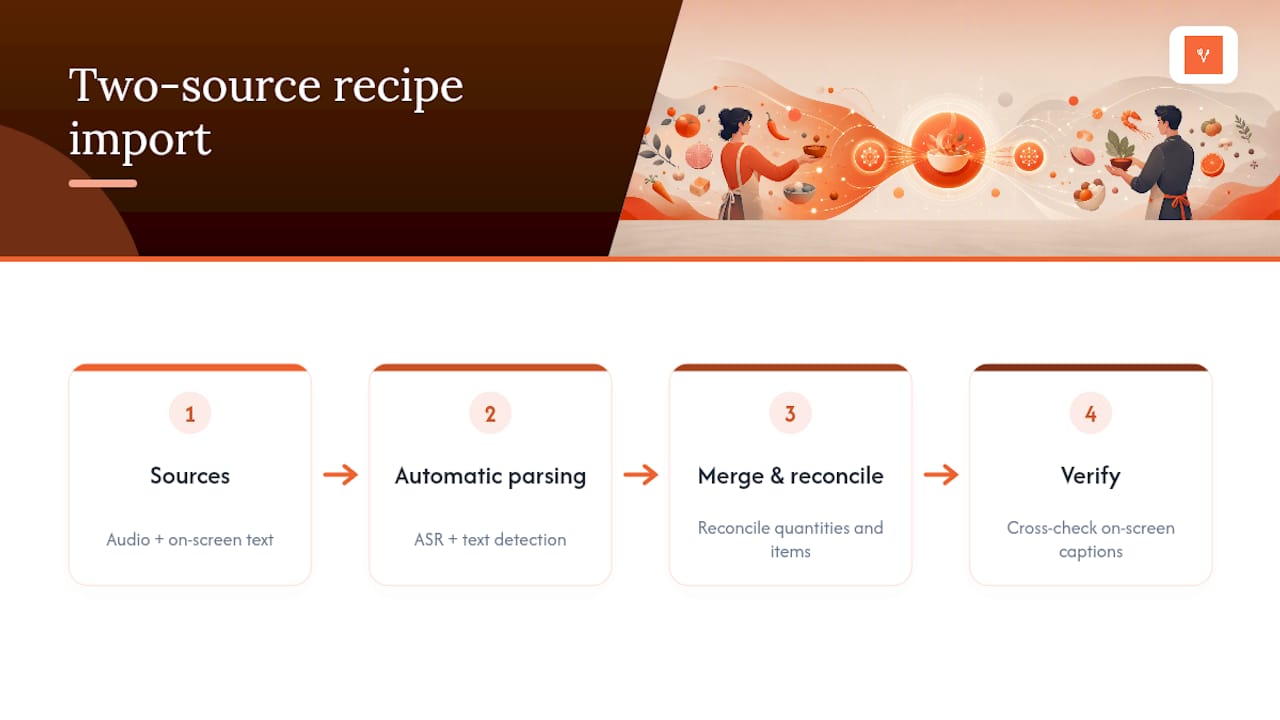
Whichever route you take, always cross-check the transcribed text against the video’s on-screen captions before you finalize the recipe. Auto-transcription tools misread ingredient names fairly often, especially uncommon spices or brand names, and a five-second video rewatch at the ingredient-list moment catches most errors before they end up on your shopping list.
Saving TikTok Videos Offline the Right Way
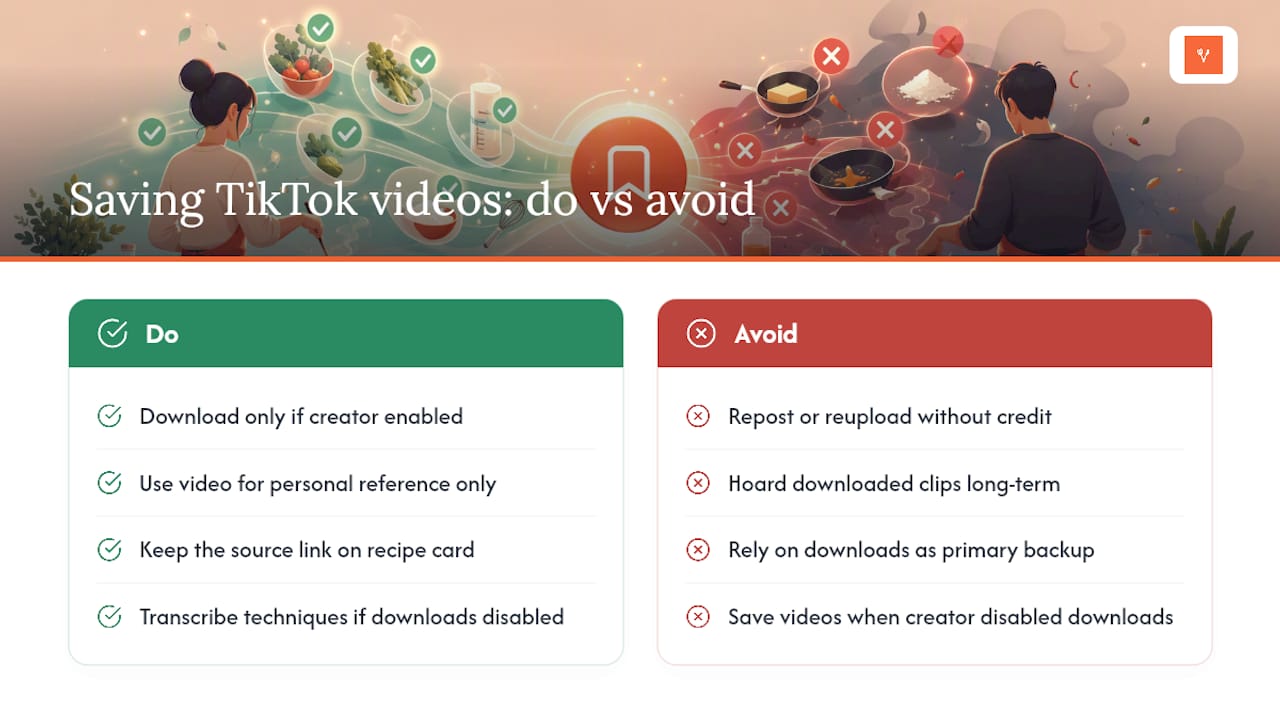
Sometimes you want the video itself for reference, not just the recipe text, especially for techniques like knife cuts or dough folding that are easier to watch than read. TikTok’s built-in download feature, when the creator has enabled it, saves a watermarked copy to your camera roll for personal viewing.
That’s the boundary worth respecting: personal reference is generally fine, but reposting, reuploading without credit, or using someone else’s video to build a following of your own crosses into copyright territory, since the creator owns that footage regardless of whether the download button was available. If a creator has disabled downloads, treat that as a clear signal they don’t want the video saved outside the app, and rely on your own written transcription instead.
For day-to-day use, most cooks don’t actually need the video saved at all once the recipe has been properly imported and verified. Keep the source link on the recipe card instead of hoarding video files. That gives you a way to rewatch the technique if you genuinely need to, without stockpiling downloaded clips you’ll never sort through. It also respects the reality that creators can and do delete their own content, which means a downloaded copy may become the only surviving version, and that’s a legal gray area you don’t want to lean on as your primary storage method.
Why TikTok Saves Disappear Faster Than You Think
TikTok Favorites feel permanent, but they’re built on a link to someone else’s content, and that link is only as stable as the creator’s account. A tracked-sample study and reporting on viral recipe videos found that roughly one-third of tracked social recipe videos became unreachable within a year, whether from creators deleting posts, deactivating accounts, or TikTok removing content that violated a policy.
That timeline matters more than it sounds. A recipe you save in January might be gone by the following January, right around the time you finally get around to making it for a dinner party. Unlike a cookbook sitting on your shelf, a bookmarked TikTok video has no guarantee of staying put, and you generally get no warning before it vanishes.
This is the core argument for extracting the recipe rather than just bookmarking the video. Once the ingredients and steps live on a card you control, whether that’s a note, a printed page, or an imported recipe in an app, it doesn’t matter what happens to the original post. The video was never the recipe. It was just the format the recipe happened to be delivered in, and formats that depend on someone else’s account staying active are inherently temporary.
Apps Built to Turn TikTok Videos Into Real Recipe Cards
A handful of apps exist specifically to solve this problem: capturing a TikTok recipe video and converting it into a structured, editable recipe rather than leaving it as a clip you have to rewatch. App store listings and product walkthroughs describe recipe manager apps built around this exact import function, pulling captions and on-screen text into ingredient lists and step-by-step instructions.
The features worth prioritizing when you’re comparing options:
- Audio and on-screen text parsing, not just caption scraping, since captions alone routinely miss spoken instructions.
- Editable fields after import, so you can fix a missing quantity without retyping the whole recipe.
- Shopping list merging, so five imported recipes for the week turn into one combined grocery list instead of five separate ones.
- Bulk import or migration support, useful if you’re consolidating recipes from multiple platforms like Paprika or Plan to Eat into one collection.
Some import tools follow this structure: capturing the video’s content, running it through a five-field check, and folding the result directly into a meal planner and shopping list, often available at no cost for core import and planning features. If you want to see how the full organization system fits together once you’ve got a stack of imported recipes, the recipe organization guide walks through naming, tagging, and batch workflows in more detail, and the shopping list guide covers how merged ingredient lists work across a full week of meals.
My Own Rule for TikTok Recipes: Import or It Doesn’t Count
My rule is simple: the moment I favorite a TikTok recipe, I import it before I close the app. No exceptions, no “I’ll get to it later” pile. I tag it, drop it on this week’s plan if it fits, and move on. Once a week, I spend ten minutes clearing out anything I favorited but never imported. Anything still sitting there after seven days gets deleted, not saved for someday.
— Jack
Sources
- How to save TikTok recipes you can actually cook — ReciBites
- The erasure problem with viral TikTok recipes — Mashed