Cut Decision Fatigue: Nutrition App for Busy, Health Conscious Users | Dinner Roulette Pro
September 15, 2026
Cut Decision Fatigue: Nutrition App for Busy, Health Conscious Users
Try Dinner Roulette Pro first if decision fatigue is your real problem: it removes the “what do I cook” question entirely and hands you nutrition facts and a shopping list with the recipe. If you need clinical-grade micronutrient tracking instead, pair it with a precision tracker like Cronometer during a short learning phase, then let the low-friction app carry your daily habit. Spin the free recipe wheel to see how it fits before deciding on anything paid.
TL;DR:
- Using a low-friction logging method like AI or barcode scanning helps minimize time spent, especially for packaged foods, while manual search remains slow and often abandoned.
- A verified food database sourced from USDA or NCCDB ensures your nutrition data is accurate, avoiding errors common in crowdsourced entries.
- For managing specific health conditions, tracking micronutrients like iron or B12 is necessary, which requires apps offering detailed nutrient breakdowns rather than just macro counting.
- Meal planning features that generate recipes, automate grocery lists, and support dietary restrictions save more decision time than simple calorie counting apps.
- Dinner Roulette Pro is ideal for decision-fatigued households by providing recipe generation, nutrition info, and shopping list integration without additional logging steps.
Table of Contents
- What Makes the Best Nutrition Tracking App for Your Goals?
- Which Feature Categories Actually Matter?
- How Do You Test and Choose an App in Two Weeks?
- Why Dinner Roulette Pro Fits Busy, Health-Conscious Users
- Getting Started With Dinner Roulette Pro
- Sources
- FAQ
What Makes the Best Nutrition Tracking App for Your Goals?
Picking a nutrition app isn’t about finding the one with the most features. It’s about matching the app’s friction level to how much effort you’ll realistically put in on a Tuesday night after work. Good Housekeeping’s testing found that users quit apps when the complexity doesn’t match their actual needs — someone who wants a quick daily habit gets buried by a data-dense micronutrient tracker, while someone chasing a specific health condition gets frustrated by an app too simple to give them answers.
Here’s the short list of criteria that actually move the needle:
- Logging friction. Photo and AI-based logging cuts entry time to seconds; barcode scanning is fast for packaged food but useless for a home-cooked stew; manual search is the slowest and the first thing people abandon.
- Nutrient depth. If you’re managing a health condition or just curious about protein and fiber, macros are usually enough. If you’re correcting a specific deficiency or working with a dietitian, you need full micronutrient breakdowns.
- Meal planning and grocery integration. An app that turns your goals into an actual dinner plan and shopping list saves more real time than one that only counts what you already ate.
- Personalization for allergies, diabetes, or CGM data. Not every app supports continuous glucose monitor imports or clinician sharing, and that gap matters a lot if you’re managing a medical condition.
- Integrations and data export. Check whether the app syncs with Apple Health, Google Fit, or a wearable, and whether you can export your data if you switch apps later.
- Pricing reality. Some apps gate barcode scanning or meal plans behind a paywall; others, like MyNetDiary, keep barcode scanning and a 2 million plus food database in the free tier.
- Retention risk. Ads, cluttered interfaces, and forced account creation are the quiet reasons people delete an app after four days.
Pro Tip: Before downloading anything, write down the one metric you actually care about, whether that’s weight, protein intake, or simply eating dinner without a 6 p.m. panic. Test every app against that single metric first, not against a feature checklist.
Which Feature Categories Actually Matter?
Feature lists look identical on marketing pages. In practice, the details inside each category decide whether an app earns a permanent spot on your phone or gets deleted by Friday.
Logging methods: speed versus accuracy
Photo-based AI logging is the fastest option and improves constantly, but it can misjudge portion sizes on mixed dishes like casseroles or stir-fries. Barcode scanning is nearly perfect for packaged food and useless for anything homemade. Manual search sits in the middle: accurate if you’re patient, painful if you’re not. A reasonable test is logging the same real dinner three ways across a weekend and timing yourself.
Database quality: who verified the food entry?
This is the part most people skip, and it’s the one that determines whether your numbers mean anything. Cronometer builds much of its database on USDA SR Legacy and NCCDB sources, which is about as close to a verified standard as consumer apps get. MyNetDiary takes a different route with a staff-verified database of more than 2 million foods. Apps relying heavily on user-submitted entries can list 80-plus nutrients and still be wrong, because a crowdsourced “grilled chicken breast” entry might reflect someone’s home recipe, not a lab measurement.
Macro tracking versus micronutrient tracking
Someone trying to lose weight or hit a protein target usually only needs calories, protein, carbs, and fat. Someone managing anemia, thyroid issues, or a restrictive diet needs to see iron, B12, iodine, and other numbers that a basic macro app doesn’t surface at all. Cronometer’s 84-tracked nutrients exist for exactly that second group.
Meal planning and automation
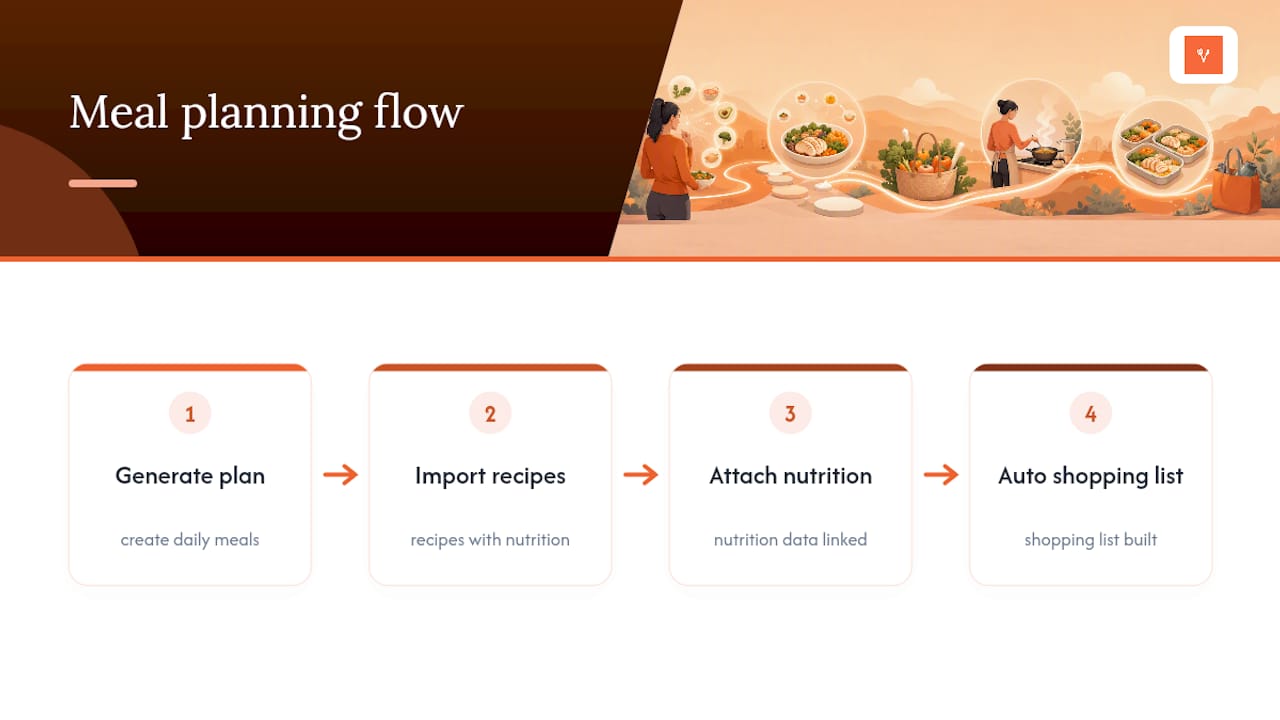
This is where most calorie counters fall flat. Counting what you ate yesterday doesn’t solve tonight’s dinner problem. Apps that generate a meal plan, pull in recipes with attached nutrition data, and build a shopping list automatically save far more decision energy than a food diary ever will.
Coaching, CGM sync, and data privacy
Some services bundle in dietitian access or behavioral coaching, which raises the price but can genuinely help people who need accountability. For anyone on a continuous glucose monitor, check specifically whether the app imports CGM data and shares trends with a clinician, since CGM compatibility is a distinct, often premium feature, not something every app offers by default. Before committing, glance at the privacy policy for data export and deletion options. Most legitimate apps disclose this in under two minutes of reading.
How Do You Test and Choose an App in Two Weeks?
Skip the endless comparison spreadsheets. A short, structured trial tells you more in ten days than a month of reading reviews.
- Pick one test goal. Decide whether you’re testing for weight change, micronutrient adequacy, or simply whether meal planning reduces your take out spending.
- Run a 7 to 14 day trial. Log every meal for at least a week, paying attention to logging speed, whether your regular foods are already in the database, and whether the meal-planning tools actually save you time.
- Track your friction points. Write down how many seconds each log takes, which foods were missing, and where you hit a paywall.
- Ask three questions before paying for anything. Where does the food database come from? Can you export your data? Does it support clinician or dietitian sharing if you need it?
- Decide based on consistency, not features. If the app reduced friction and you actually kept logging for two weeks, keep it. If you found yourself skipping days by day four, switch to a different app class entirely rather than a different app in the same category.
Pro Tip: *Set a phone reminder for day 7 of your trial and rate your own compliance honestly.
Why Dinner Roulette Pro Fits Busy, Health-Conscious Users
Most nutrition apps assume you already know what you’re cooking and just need help counting it. Dinner Roulette Pro solves a step earlier: the actual decision of what to make for dinner, which is where a lot of healthy intentions quietly fall apart.
The core mechanic is a roulette wheel. You set your preferences, dietary restrictions, and allergies, spin, and get a fully generated recipe complete with ingredients and nutrition information built into the recipe itself, no separate logging step required. Every generated recipe also comes with a shopping list, and premium users can push that list straight into Walmart or Instacart for one-tap ordering.
Here’s what that looks like in practice:
- Allergy checks and dietary restrictions are built into the recipe generation itself, not bolted on as a filter you have to remember to apply.
- A meal planning calendar turns individual spins into an actual week of dinners instead of a one-off recipe.
- Diabetic meal planning support helps users managing blood sugar plan dinners without cross-checking every ingredient manually, which pairs well with the diabetic meal planning features available in the app.
- SafeMode, a neurodivergent-friendly setting, simplifies decisions further on low-energy days when even a spin feels like too much.
- Multilingual support and recipe import mean the tool adapts to households that cook across more than one cuisine or language.
This app is best for people whose real obstacle is decision fatigue: busy families staring at the fridge at 5:30 p.m., neurodivergent users who find open-ended choices draining, and anyone tired of defaulting to takeout three nights a week. It’s a weaker fit for someone managing a diagnosed micronutrient deficiency who needs to track 80-plus nutrients daily. In that case, a dedicated precision tracker like Cronometer during a learning phase, paired with Dinner Roulette Pro for the actual cooking and planning, covers both needs honestly.
The gap most nutrition apps miss isn’t nutrient tracking. It’s the fact that people abandon healthy eating at the decision point, before a single calorie gets logged. Removing that decision is worth more to most households than another decimal point of micronutrient precision.
To trial it, start with the free core product: spin the wheel a few times, check the nutrition panel on a generated recipe, and build one shopping list. That’s enough to know whether the friction reduction is real for your household before you consider a premium plan.
Consistency beats perfection
Every nutrition app promises accuracy. Almost none of them promise you’ll actually open the app on day 12. That’s the real filter.
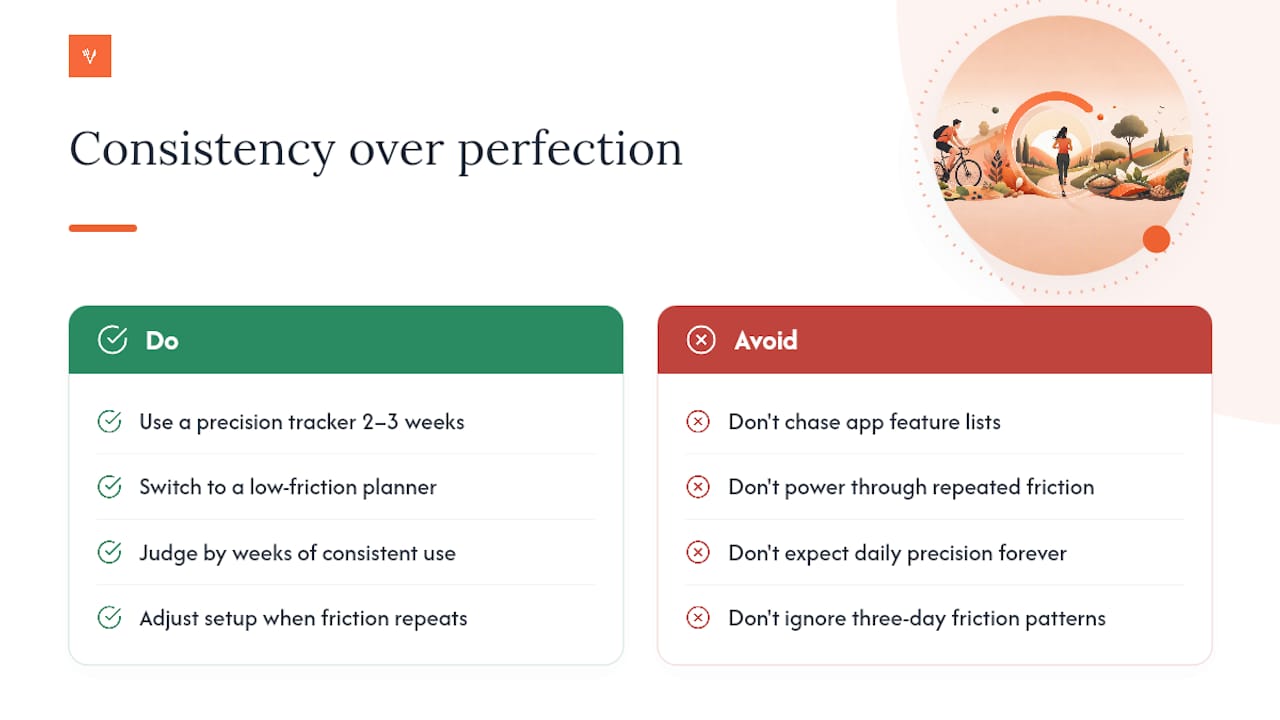
If you’re new to tracking and genuinely need to learn where your diet falls short, spend two or three weeks in a precision tracker like Cronometer. Once you understand your patterns, most people don’t need that level of detail every single day, they need a habit that survives a busy week. That’s when a low-friction planner earns its place.
Judge fit by weeks of consistent use, not by how many features an app lists on its landing page. If you notice the same friction point three days in a row, whether that’s a missing food, a clunky log screen, or decision fatigue at dinner, treat that as real data and adjust your setup rather than powering through it.
— Jack
Getting Started With Dinner Roulette Pro
If the biggest thing standing between you and better dinners is the decision itself, not the counting, Dinner Roulette Pro is built for exactly that gap. Unlike a standalone calorie counter, it hands you the meal and the nutrition data in one move.
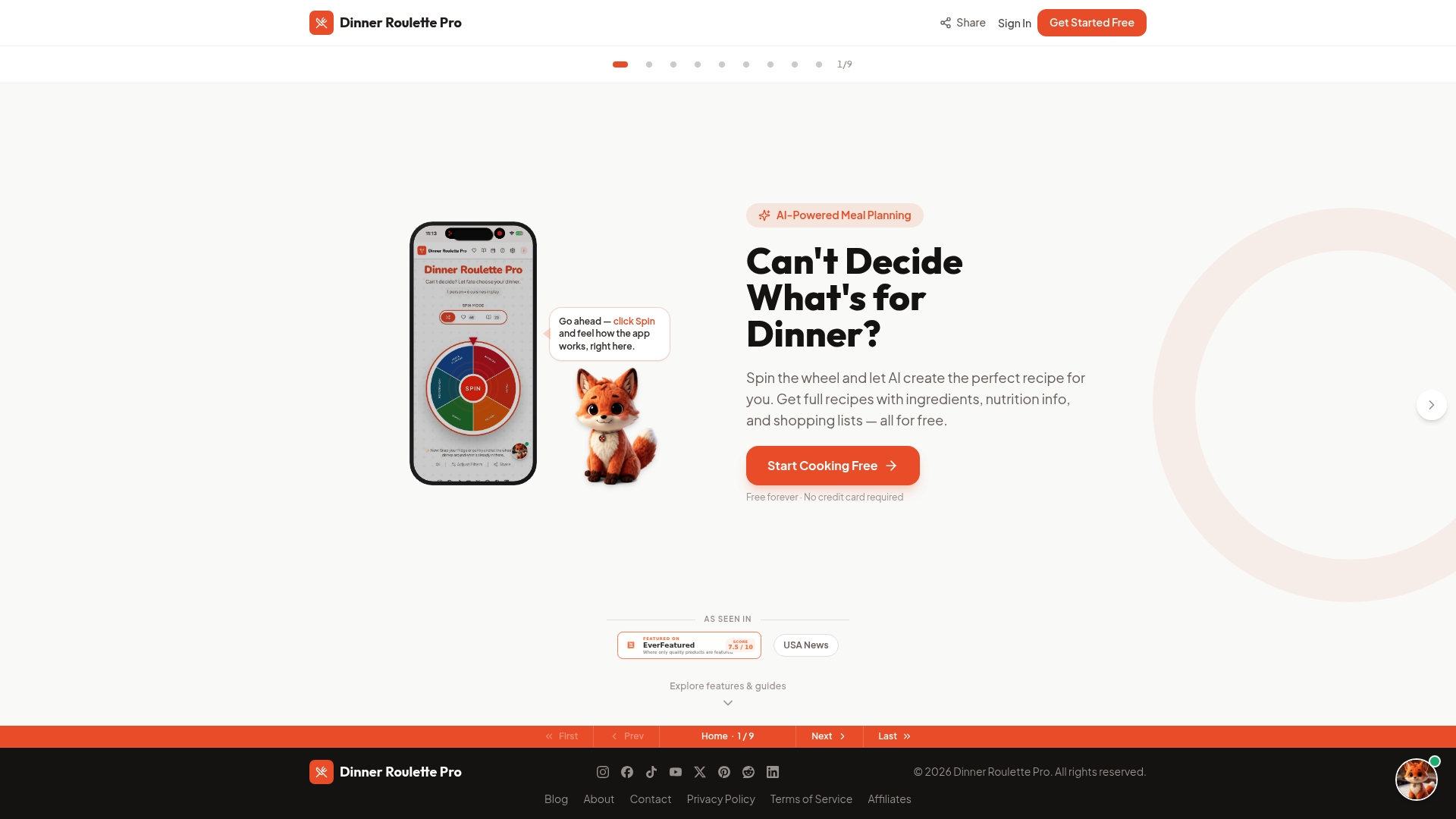
Start by setting your dietary preferences and any allergies in the app, then spin the wheel and see what comes back. Each recipe arrives with nutrition information already attached, so there’s no separate logging step to learn. Add a few recipes you like to your planner, then export the resulting shopping list to Walmart or Instacart to skip the grocery-store guesswork entirely.
The free version covers recipe generation, allergy checks, and basic planning. Premium unlocks more advanced nutrition scoring and deeper personalization for restrictive diets. If you want a walkthrough on organizing recipes once you’ve collected a few favorites, the recipe organization guide is a good next stop. For readers curious how the underlying nutrition information is calculated and displayed, that guide breaks down what’s shown on each recipe card.
Sources
- The Best Nutrition Apps of 2026: Approved by Experts | Fortune
- Cronometer — Calorie & Micronutrient Tracker (84 Nutrients)
- MyNetDiary: Free Calorie Counter With Verified Foods
- 9 Best Food Tracking Apps, Tested and Recommended by Dietitians | GoodHousekeeping
FAQ
Is There a Better Tracker Than MyFitnessPal?
It depends on what you need. If you want deeper micronutrient data, Cronometer’s 84-nutrient tracking goes further than most general calorie counters, and if your real problem is deciding what to cook rather than logging it, an app like Dinner Roulette Pro solves a different bottleneck entirely.
What Is the Number One Food Tracker App?
There isn’t a single universal winner. Fortune’s expert roundup names clinician-backed, meal-planning-focused apps as top picks for busy professionals, while precision-focused users often prefer a nutrient-dense tracker like Cronometer instead.
What Is the Best App for Calculating Nutritional Needs?
Apps that pull from verified databases like USDA SR Legacy and NCCDB, such as Cronometer, give the most reliable nutrient calculations because the underlying food data has been checked against standardized sources rather than user submissions.
Is MyFitnessPal Still Free?
MyFitnessPal offers a free tier, but several core features sit behind a paywall. Apps like MyNetDiary keep barcode scanning and a large verified food database free, which is worth comparing if cost is your deciding factor.
How Do I Track Nutrition Without Feeling Overwhelmed by Logging?
Choose a logging method that matches your patience level: photo or AI-based logging for speed, or an app like Dinner Roulette Pro that builds nutrition facts into the meal itself so you’re not logging separately at all.